Plan Your Event Like a Pro
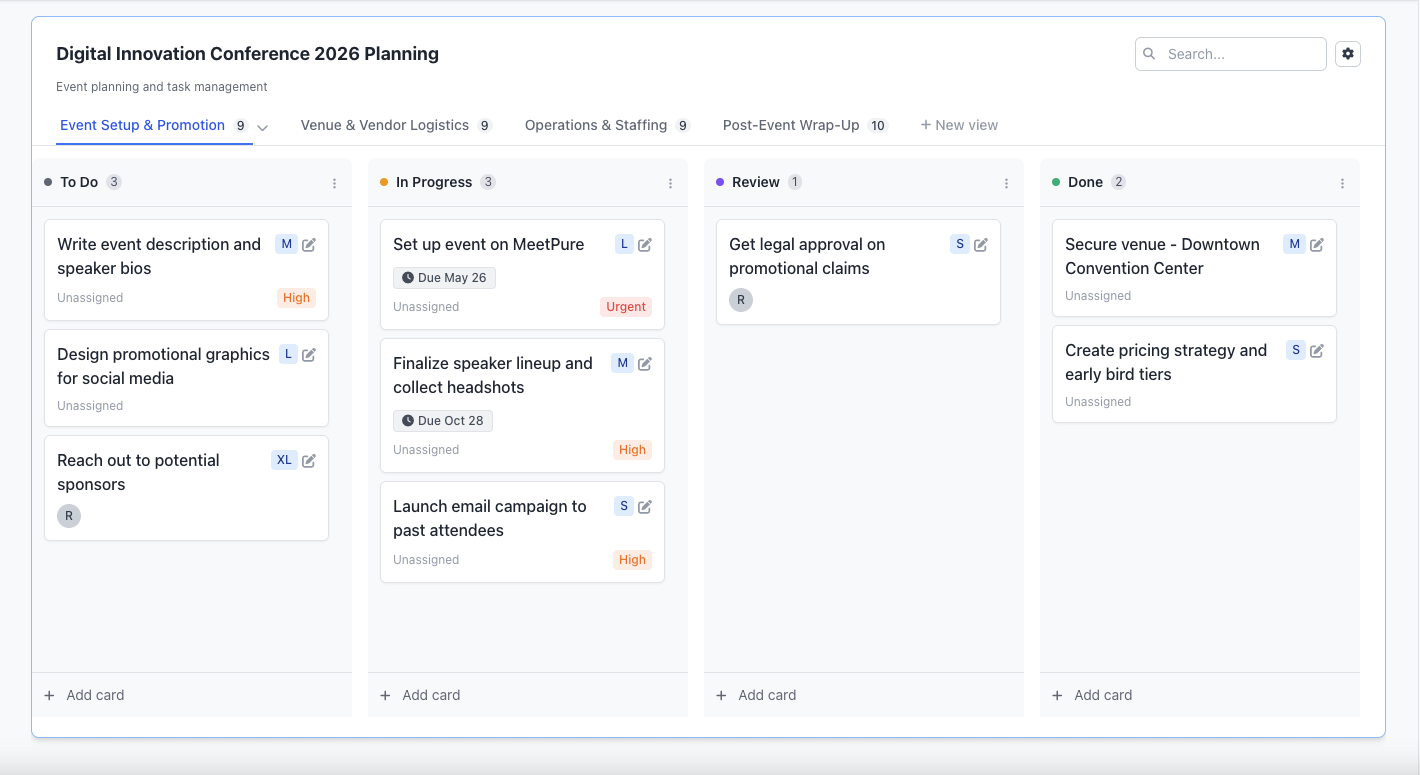
Don't pay extra for project management tools. MeetPure Events includes a built-in task board to track every task from venue booking to day-of coordination.
Why Use a Built-in Planner?
Stop juggling between spreadsheets, Trello, and your event platform. Keep everything in one place.
Spreadsheets & Notes
Scattered tasks, no visibility, easy to lose track of what's done
MeetPure Events Planner
Visual task board, team assignments, linked to your event
The Results
Nothing falls through the cracks. Your team stays aligned. Events run smoothly.
Planner Features
Everything you need to plan and execute successful events
Kanban-style Task Board
Drag and drop tasks across To Do, In Progress, and Done columns. See your event progress at a glance.
Team Assignments
Assign tasks to team members so everyone knows their responsibilities. No more confusion.
Due Dates
Set deadlines for tasks and never miss a vendor payment or venue booking deadline again.
Checklists
Break down complex tasks into subtasks. Track completion at a granular level.
Pre-built Templates
Start with templates for conferences, workshops, fundraisers, and more. Customize to fit your needs.
Event Integration
Your planner is linked to your event. Access tickets, attendees, and settings without switching tools.
What Can You Plan?
From small gatherings to large conferences, the planner adapts to your needs
Venue & Logistics
Booking, setup, catering, AV equipment, parking
Speakers & Agenda
Confirmations, bios, presentations, schedule
Marketing & Promotion
Social media, email campaigns, partnerships
Day-of Coordination
Volunteer assignments, check-in setup, run of show
How It Works
Get started with event planning in minutes
Create Your Event
Set up your event on MeetPure Events with all the basic details
Access the Planner
Go to your event's Planner tab and start adding tasks or use a template
Track & Complete
Move tasks across columns as you complete them. Stay on track until event day.
See the Planner in Action
Watch how MeetPure Events helps you plan and manage your events
Save Money on Tools
Other platforms make you pay extra for project management. We include it free.
| Feature | Others | MeetPure Events |
|---|---|---|
| Event Planning Tools | Extra $10-20/mo | Included |
| Team Collaboration | Separate tool needed | Included |
| Task Templates | Premium feature | Included |
| Integration with Event | Built-in |
Frequently Asked Questions
Everything you need to know about the MeetPure Events Planner
Yes! The event planner is included free with every event you create on MeetPure Events. There are no additional charges, no premium tiers, and no limits on the number of tasks or team members. It's one of the many tools we include to help you succeed.
After creating your event, go to your event dashboard and click on the "Planner" tab in the navigation. The first time you access it, you'll need to initialize the planner—just click the button and choose whether to start with a blank board or use a template. After that, you'll see your task board where you can start adding tasks, assigning team members, and tracking progress.
Yes! Team members who have access to your event can view and update the planner. You can assign tasks to specific team members, and they'll be able to see their assignments and mark tasks as complete.
We offer templates for common event types including conferences, workshops, fundraisers, community gatherings, and more. Each template includes pre-defined tasks organized by category (venue, speakers, marketing, day-of coordination) that you can customize to fit your needs.
Yes! You can create custom columns to match your workflow. Whether you need "Waiting for Approval," "Blocked," or any other status, you can add, rename, and reorder columns as needed.
Yes! You can use the planner for any event, even if you're selling tickets elsewhere. Simply create a draft event on MeetPure Events (you don't need to publish it), then initialize the planner. You'll have full access to all planning features without having to use our ticketing or registration.
The MeetPure Events Planner is specifically designed for event planning and is integrated directly with your event. You don't need to switch between tools—your tickets, attendees, and event settings are all accessible from the same place. Plus, it's free with your event, so you don't need another subscription.
Ready to Plan Your Next Event?
Create your event and start using the built-in planner today. It's free to get started.